
Calendar
Appointments, recurrence, time zones and sharing.
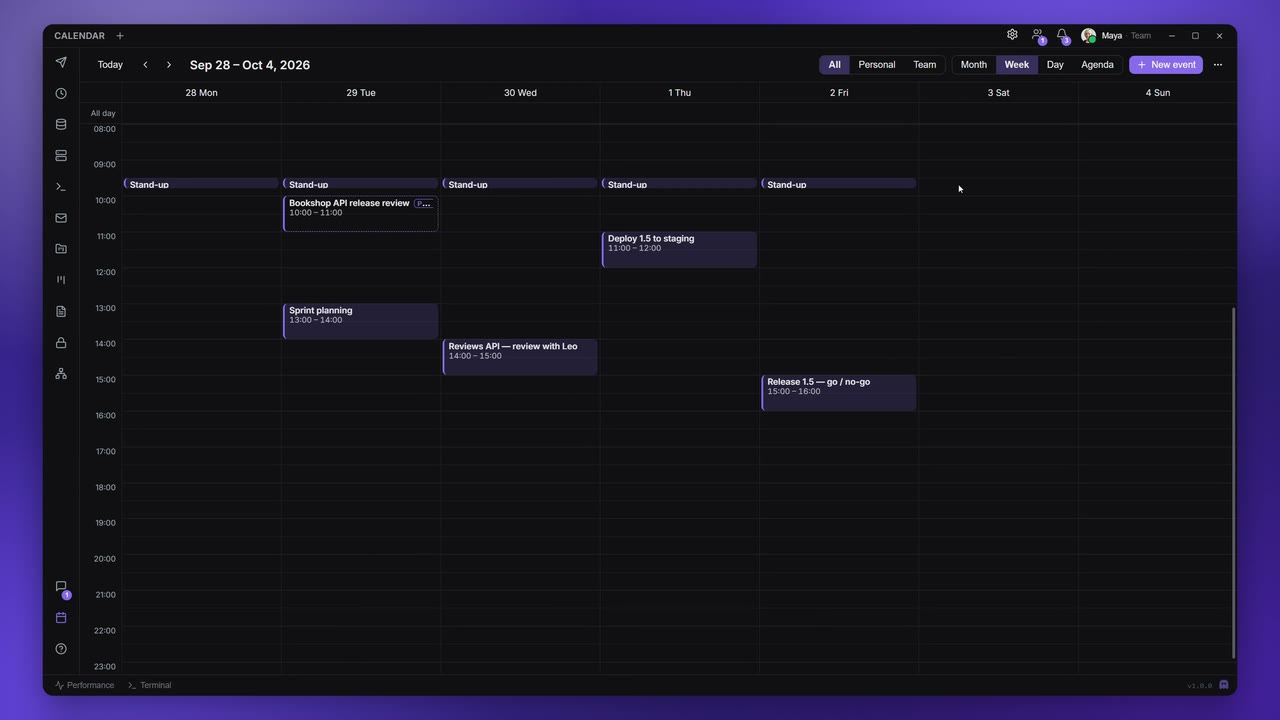
The Calendar keeps your appointments and your team's next to your work: release dates, reviews, stand-ups. It works fully offline and on the Free plan; on a paid plan it syncs across your devices.
Views and navigation
Open Calendar on the rail. The toolbar has Today, the arrows for the previous and next period, the date range you are looking at, and:
- All, Personal, Team: which appointments to show;
- Month, Week, Day and Agenda (the next 30 days as a list);
- New event;
- the ⋯ menu with Import .ics and Export .ics.
Keyboard shortcuts (with the calendar focused, no modifier keys):
| Key | Does |
|---|---|
| T | Go to today |
| M, W, D, A | Month, Week, Day, Agenda view |
| N | New event |
| ← → | One day back or forward |
| ↑ ↓ | One week back or forward |
| Esc | Close the open popover |
Create an appointment
Click New event (or press N). In Week and Day view you can also drag across empty time to create one; in Month view, double-click a day or right-click it → New event.
The editor has:
| Field | What it does |
|---|---|
| Title | "Add a title" |
| Starts, Ends | Date and time, in 15-minute steps. All day removes the times. |
| Repeats | See Recurrence |
| Calendar | Personal, or a team you are an editor (or more) on |
| Location | Free text |
| Reminders | Up to five: at start, 5, 10, 15 or 30 minutes, 1 hour or 1 day before |
| Invitees | People to invite, by name or email (see Invitations and sharing) |
| Notes | A description |
Click Save. Delete removes an existing appointment.
Move and change appointments
- In Week and Day view, drag an appointment to move it, or drag its bottom edge to change its length. Both snap to 15 minutes. Month view has no dragging.
- Right-click an appointment for Open, Edit, Duplicate and Delete.
Recurrence
Repeats offers Does not repeat, Daily, Weekly and Monthly, with "every N" days, weeks or months. Weekly adds Repeat on to pick the weekdays. Ends is Never, On date or After a number of times.
When you edit or delete one occurrence of a repeating appointment, Apiboo asks whether you mean This event or All events. Dragging a single occurrence changes only that one, without asking.
Time zones
You enter times on your own clock, and Apiboo stores them as absolute times. When you travel or a teammate lives elsewhere, everyone sees the appointment at the right local time. There is no separate time-zone picker per appointment.
Import .ics understands the time zones in calendar files from other apps, including Windows zone names.
Invitations and sharing
Invitees in the editor invites people: they get a notification and can accept or decline. Sending invitations needs a paid (cloud) plan. You can't invite people to a repeating appointment yet, and a team appointment needs no invitations, because everyone on the team sees it.
You can also share an appointment into a chat: in the composer, click Share an appointment and pick one of your upcoming personal, non-repeating appointments from the next 60 days. Everyone in the conversation gets an invitation card with Accept and Decline; accepting adds it to their calendar. See Share your work into a conversation.
Team calendars
Choose a team under Calendar in the editor and the appointment belongs to the team: every member sees it, with "Created by" and the author's name. Team viewers can open appointments but not change them ("View only — you're a viewer on this team.").
The calendar and AI agents
With the Calendar permission on the MCP Server, an AI agent can read your appointments for a date range, so it knows your deadlines, and with the write grant it can create and change them. Invitations you haven't accepted yet are not included. Deleting an appointment also needs the destructive switch.