
How MCP helps an AI agent
Context, memory across sessions and safe changes: what an agent gets from your workspace.
An AI coding agent like Claude Code or Codex knows your code. It doesn't know what the code is for: the spec in your documents, the task that says what's blocked, the release date, the requests you test with. Connected to Apiboo's MCP Server, it can read all of that, remember what it learned for next time and make changes you can see and check, within the permissions you set.
Context: what the agent can read
| From | The agent learns | Permission |
|---|---|---|
| Documents | Your specs, notes and decisions. Documents are also offered as resources with their last change, so the agent reads the newest first. | Documents, read |
| Boards | What is in progress, what is blocked and in what order | Boards, read |
| Calendar | Deadlines and release dates, in your time zone | Calendar, read |
| Collections | Your requests, folders and environments (without secret values) | Collections, read |
| Graph | How it all connects, including the links you drew | Graph, read |
A good first step for an agent is the Graph: graph_project returns a whole project with everything one link around it, so the agent sees which documents, tasks and requests belong together before it touches anything. It treats the links you drew (covers, depends on, documents) as your intent. See The Graph for AI agents.
Memory across sessions
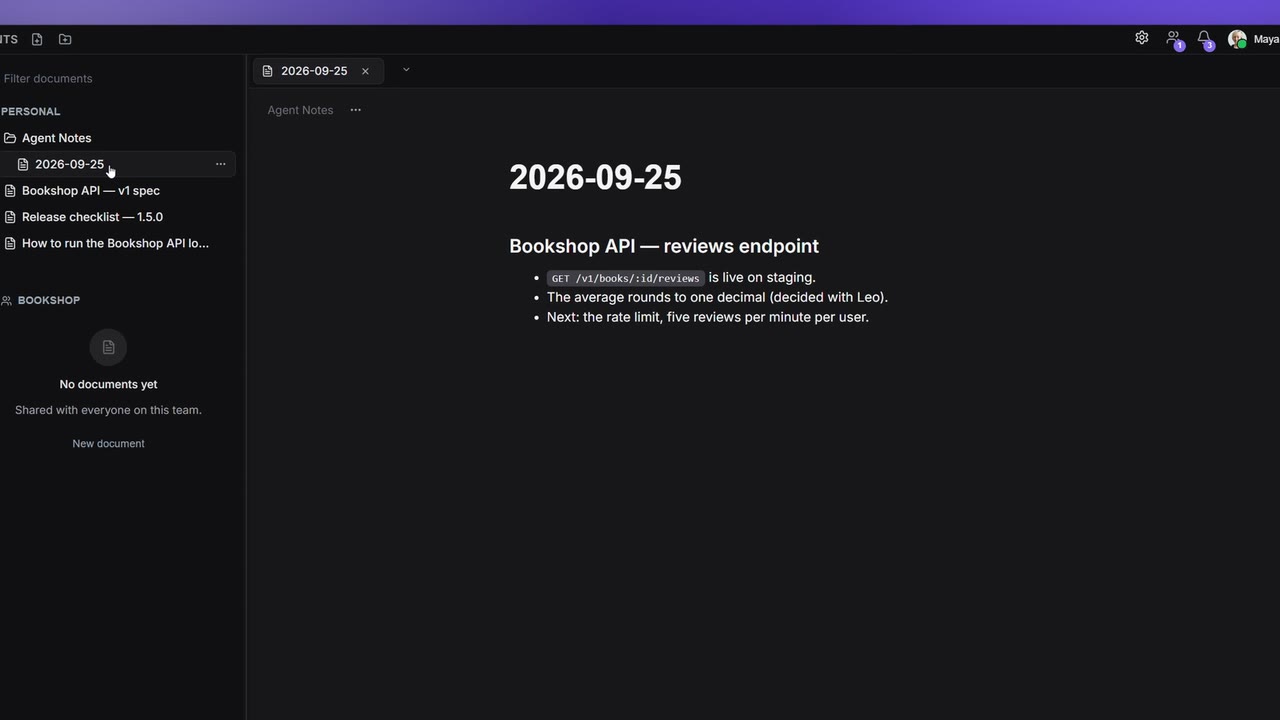
An agent forgets everything when its session ends. Agent notes fix that:
- Notes live in the Agent Notes folder in your Documents, an ordinary folder you can open, read, edit and delete.
- An agent reads its notes when a session starts (
memory_list,memory_read) and appends what it learned at the end (memory_append). A note is titled with the day's date unless it names a topic. - The notes have their own permission, Agent notes, so you can allow notes without letting the agent write your other documents.
- Apiboo never writes a note by itself. Only an agent you connected does, and only when you allowed it.
- Emptying the whole folder (
memory_purge) also needs the destructive switch.
Safe changes
| Safeguard | What it means |
|---|---|
| Per-area switches | Read and write per area, all off to begin with. Allow all turns reading and writing on, but never the destructive switch. |
| Destructive switch | Deleting documents, tasks, boards, appointments or requests, and running commands on servers, needs a separate switch that is off by default. |
| No silent overwrites | Changing text a person may have typed needs the revision the agent read (expected_rev). If you changed it meanwhile, the agent gets a conflict and reads it again. |
| Rate limits | 240 reads, 60 writes and 10 destructive calls per minute. |
| One token | Stored as a hash only and shown once. Regenerating it locks out every old client. |
| Terminal panes | Attach Apiboo MCP gives an agent in an Apiboo terminal pane its own temporary token with your grants. It ends with the pane. |
| No secrets | The Vault, passwords, variable values and responses are never reachable. |
Everything an agent writes shows up in Apiboo right away, in the same places as your own work, so you can check it and change it back.
Examples
"Plan the release on the Bookshop board." The agent reads the Bookshop board and the release doc, creates a "Release 1.4" list, adds a task per open item and comments on the ones it can't place. Needs Boards read and write, Documents read.
"Write the API doc from the collection." It reads the Bookshop collection's requests (Apiboo leaves out body values, credentials and variable values) and writes a new document with an endpoint reference. Needs Collections read, Documents write.
"Diagnose why this request fails." request_diagnose checks the saved request: every {{variable}} it uses and whether it is defined, empty, switched off or missing from the selected environment; which auth it really uses; a body sent without a matching Content-Type; a body that doesn't parse; duplicate headers; a URL with no scheme. The agent never sees a response, so if that isn't enough, it asks you for the status code and the message. Needs Collections read.
"Import the OpenAPI spec." The agent passes the spec file from your repository to spec_import: OpenAPI 3.x, Swagger 2.0, Postman, Insomnia, HAR, Bruno (a request, or a collection exported from Bruno as one JSON or OpenCollection YAML file), Hoppscotch or an Apiboo export, up to 5 MB, as text (it never fetches a URL). A Bruno collection folder can't go through MCP; import it in the app. Environments inside a file are never written. It can do a dry run first to show what would be created. Operations are grouped into one folder per tag. Needs Collections write.
"Deploy the Bookshop API to staging." With the Terminal permission and your approval on every command. See Walkthrough: deploy the Bookshop API to staging.