
Import & export
Bring in Postman, Insomnia, Bruno, Hoppscotch, OpenAPI, HAR and cURL, and export your collections.
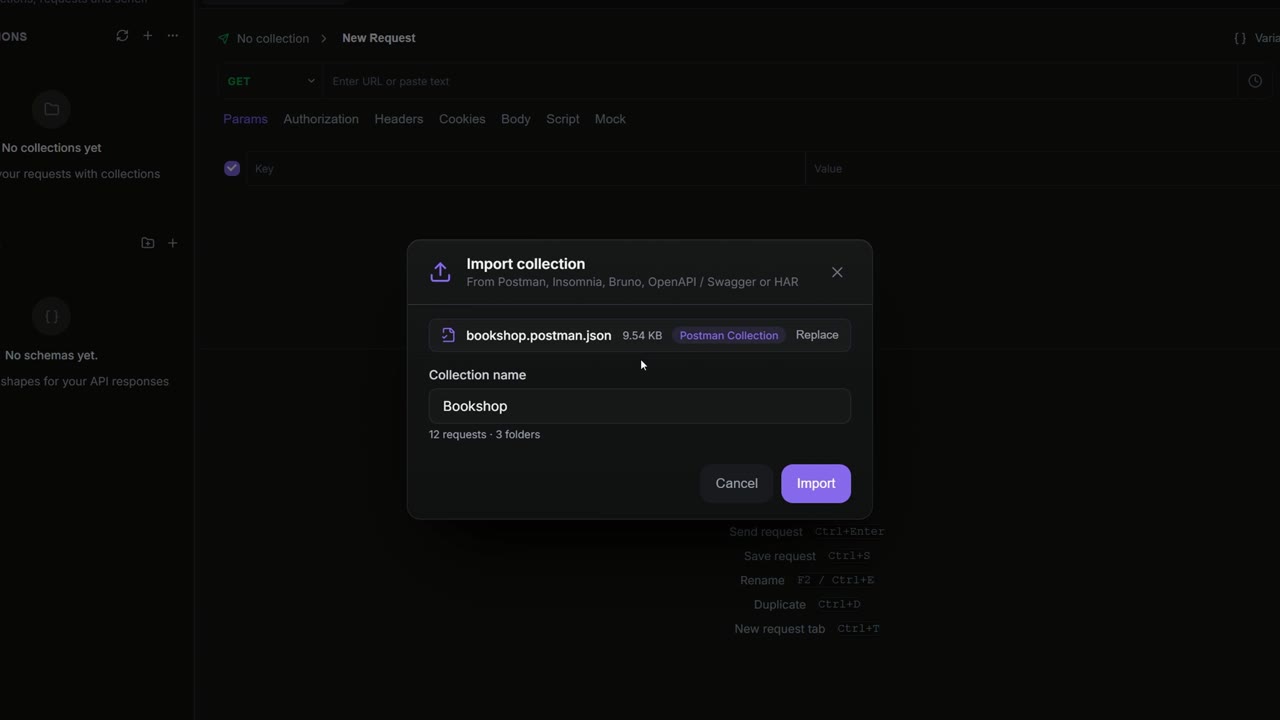
Moving to Apiboo doesn't mean starting again. Import a collection file from Postman, Insomnia, Bruno, Hoppscotch, an OpenAPI or Swagger spec, or a HAR recording, or a whole Bruno collection folder, and paste cURL commands straight into a request. When you need to hand a collection to another tool, export it in the format that tool reads.
Open the import dialog
There are three ways in:
- In the API Client sidebar, open the … menu at the top and choose Import collection.
- Press Ctrl+K and run Import Collection.
- Drag a file from your file manager onto the API Client sidebar. When the sidebar shows Import into Apiboo, let go. This imports the file straight away, without the dialog.
Supported formats
Apiboo recognises the format from the file's content, not from its name. The file must end in .json, .yaml, .yml, .har or .bru. You can also drop a Bruno collection folder on the dialog, or pick one with Choose folder (see Import a Bruno collection folder).
| Format | Files |
|---|---|
| Apiboo Collection (v1) | Apiboo's own format, the most complete. |
| Postman Collection v2 | v2.0 and v2.1 exports, .json. |
| Postman Environment | A Postman environment export, .json. It becomes an environment, not a collection. |
| Insomnia v4 export | .json or .yaml. |
| OpenAPI 3.x | .json or .yaml. |
| Swagger 2.0 | .json or .yaml. |
| HAR (HTTP Archive) | .har, for example saved from your browser's network panel. |
| Bruno | A collection folder (.bru files, or the YAML files Bruno writes since 3.1), a collection exported from Bruno as JSON or OpenCollection YAML, or a single .bru / .yml request. |
| Hoppscotch | A collection export (one collection or all of them), .json. |
| Hoppscotch Environment | An environment export (one or all), .json. |
A file that matches none of these shows Unrecognized format with the list of supported ones.
Import a file
- Open the Import collection dialog.
- Drop a file on Drop a file here or click to browse, or click it to pick one. Replace swaps the file for another, and Choose folder next to it switches to a Bruno collection folder.
- Check the preview. It shows the detected format, the Collection name with the number of requests and folders, and any Notes about things that couldn't be imported.
- If the file holds several collections, each has a checkbox (all ticked) and an optional new name. Untick the ones you don't want.
- Click Import.
The collections are added as new collections to the workspace you're in. A local workspace keeps them on this device; a cloud workspace saves them to your account in one go.
Import a Bruno collection folder
- Open the Import collection dialog.
- Drop the collection's folder (the one with
bruno.jsonoropencollection.ymlin it) on the drop zone, or click Choose folder under it and pick the folder. With a file already loaded, Choose folder sits next to Replace. - Check the preview. If the collection has environments, Also import N environments is ticked; untick it to leave them out.
- Click Import. The environments are added once the collection is in; if the import fails, the dialog stays open and no environment is added.
Apiboo reads only Bruno's own files (bruno.json, .bru, .yml, .yaml). It never reads hidden files or folders such as .env and .git, node_modules, or anything the collection's ignore list names. A folder holding several collections imports each as its own collection. The sidebar only takes files; to import a folder, use the dialog.
What comes across
| From | What you get |
|---|---|
| Postman | Folders at any depth; collection and folder variables (see Folder variables); auth on the collection, folders and requests (Bearer, Basic, API Key and OAuth 2.0); pre-request and test scripts at every level; saved responses as mock examples. |
| Insomnia | Each request group becomes a collection of its own; requests outside any group go into a collection named "workspace (Other)". Group environments become collection variables. Bearer and Basic auth come across, and so do pre-request and after-response scripts. |
| OpenAPI / Swagger | One collection named after the spec's title. The first server becomes the base URL, each operation's first tag becomes a folder, and each operation becomes a request named after its summary. |
| HAR | One collection with one request per recorded entry. |
| Bruno | Folders (with their own names and order), collection and folder variables, auth on the collection, folders and requests (Bearer, Basic, API Key, AWS Signature v4 and OAuth 2.0), headers, query params, bodies (JSON, text, XML, form, multipart, GraphQL), request and collection docs, and pre-request, post-response and test scripts. Collection and folder headers are copied onto each request. Environments come too, and are added without being selected. Not carried over: assertions, request variables, saved examples, gRPC and WebSocket requests, and values in Bruno's .env file. |
| Hoppscotch | Folders at any depth, collection variables, auth (a folder set to None stays without auth), headers (collection and folder headers are copied onto each request), params, bodies and pw.* pre-request and test scripts. <<variables>> become {{variables}}. Not carried over: request variables and saved responses. |
Anything Apiboo can't carry over is listed under Notes in the preview, for example an auth type it doesn't support or a binary Postman body.
Import an environment
Drop or pick a Postman environment export the same way. Apiboo adds it as a new environment with all its variables and selects it. If an environment with the same name exists, the new one gets " (2)" added to its name.
Postman's "secret" flag is not carried over: every imported variable arrives as a normal one, so mark sensitive values as secret again (see Variables & environments).
Hoppscotch environments come from their own export (not from a collection export) and import the same way (an export of all environments adds each one and selects the first). Secret variables from Bruno or Hoppscotch arrive marked secret with an empty value, and the preview says how many to fill in.
Paste a cURL command
cURL isn't in the import dialog. Instead, copy a curl command (for example from your browser's "Copy as cURL") and paste it into the URL field of an HTTP request. Apiboo fills in the method, URL, headers, query params, cookies and body, and says Imported from cURL.
A body read from a file with -d @file can't be imported; Apiboo tells you when that happens.
Postman scripts
Imported scripts are not rewritten. They run as they are, because Apiboo's script sandbox understands the pm.* API alongside its own boo.* API. What works and what doesn't is in Postman scripts (pm.*). Bruno (bru.*, req, res, test()) and Hoppscotch (pw.*) scripts are kept as they are too; see Bruno scripts (bru.*, req, res, test) and Hoppscotch scripts (pw.*).
Export a collection
- Right-click the collection in the sidebar and choose Export collection…. You can also use the … menu at the top of the sidebar or the command palette.
- Pick a Format.
- Click Export and choose where to save the file.
| Format | File | Notes |
|---|---|---|
| Apiboo Collection (v1.0) | <name>.apiboo.json | The default. Keeps everything, including scripts, mock examples, cookies and folder auth. |
| Postman Collection v2.1 (.json) | <name>.postman_collection.json | For Postman and tools that read its format. |
| Insomnia v4 (.json) | <name>.insomnia_collection.json | For Insomnia. |
| Bruno collection (folder) | a <name>-bruno folder | One .bru file per request, written the way Bruno writes them (auth: inherit, params:query, API key placement). Collection and folder auth are not exported. |
| OpenAPI 3.0 (.yaml) | <name>.openapi.yaml | For Swagger UI and API tooling. |
| OpenAPI 3.0 (.json) | <name>.openapi.json | The same, as JSON. |
If a format can't hold something in the collection, the dialog lists it under Export notes before you export. An OpenAPI export, for example, leaves out auth flows, scripts and collection variables.
Import from the API Network
APIs published to the Apiboo API Network open in the app through an apiboo://network/… link. The Import from API Network dialog shows the workspace, who published it and how many collections and requests it has. Import as personal workspace creates a private cloud workspace with a copy of it: its collections, environments and variables. Your copy is independent, so later changes to the published API don't reach it.
You need to be signed in. If you aren't, Apiboo asks you to sign in first and then continues the import.