
Scripts & tests
Pre-request and post-response scripts, the boo.* API, Postman's pm.*, Bruno's bru.* and Hoppscotch's pw.*, and the test results.
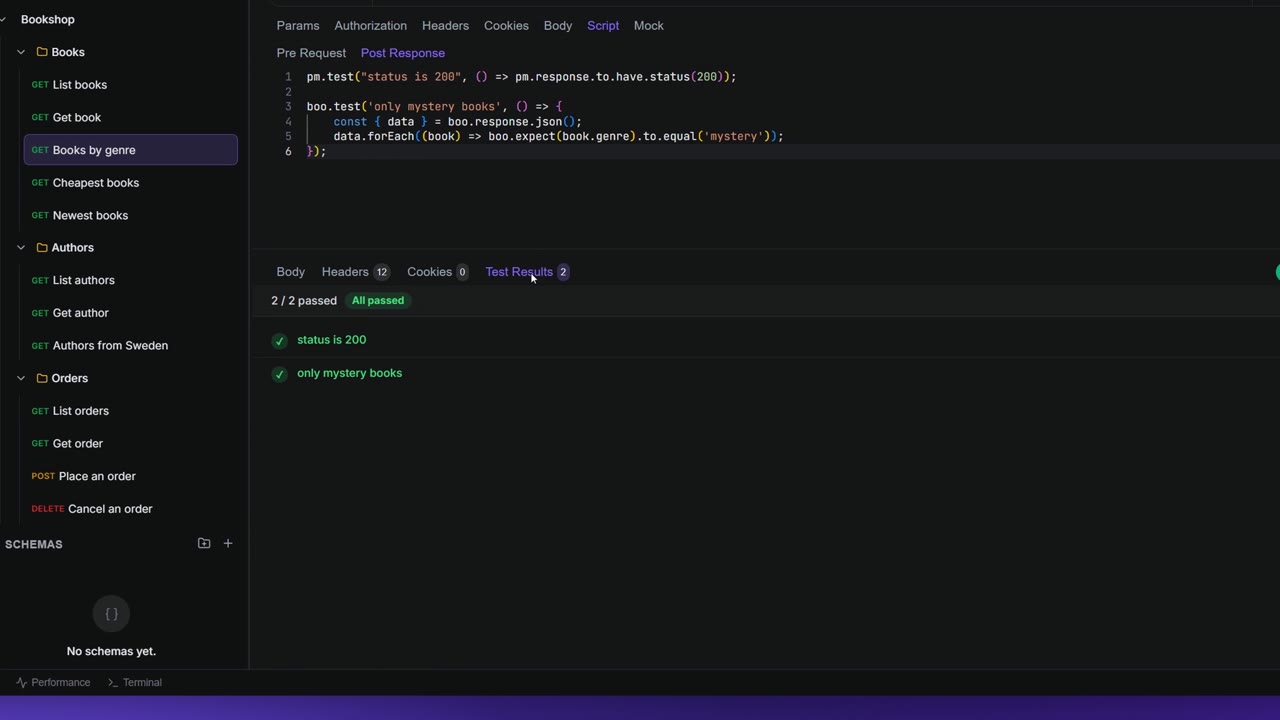
Scripts are small pieces of JavaScript that run with a request. A pre-request script runs before the request goes out, for example to fetch a token. A post-response script runs after the response arrives and usually holds your tests: "the status is 200", "the list has ten books". Apiboo's own script API is boo.*, and Postman's pm.* works too, and so do Bruno's bru.*/req/res/test() and Hoppscotch's pw.*, so most imported scripts run unchanged (the exceptions are listed below).
Where scripts live
Open a request and click the Script tab. It has two parts:
| Part | Runs | Typical use |
|---|---|---|
| Pre Request | Before the request is sent. | Set or compute variables, fetch a token. |
| Post Response | After the response arrives. | Tests, and saving values from the response. |
The editor is a full code editor with JavaScript highlighting and autocomplete. Ctrl+Enter (⌘+Enter) sends the request from inside it, and Save saves the scripts with the request.
For each send the order is always:
- the request's Pre Request script;
- the request is sent;
- the request's Post Response script.
Write a test
A test is a name and a function. If the function throws, the test fails.
boo.test('status is 200', function () {
  boo.expect(boo.response.code).to.equal(200);
});

boo.test('returns books', function () {
  const books = boo.response.json();
  boo.expect(books).to.be.a('array');
  boo.expect(books.length).to.be.above(0);
});
The response object also has shortcuts for common checks:
boo.test('ok and JSON', function () {
  boo.response.to.be.ok();            // any 2xx status
  boo.response.to.have.status(200);
  boo.response.to.have.header('Content-Type');
});Autocomplete and snippets
Type boo. or pm. to see the members. At the start of an empty line, autocomplete also offers ready-made snippets:
- boo.test — status code is 200
- boo.test — body value equals
- boo.test — response time is fast
- boo.test — has header
- boo.environment.set — save token
- boo.variables.set — from response
Read the test results
After you send, open the Test Results tab of the response. Its badge shows how many tests ran.
- A summary, for example 3 / 3 passed, with a badge for all passed or the number that failed.
- Every test with a tick or a cross, its name and, if it failed, the reason.
- A script that crashed is listed as Script error: with the message.
- When a test failed, Explain failures asks the AI assistant to help.
If the tab says No tests defined, the request has no post-response script. Run the request to see test results means you haven't sent it yet.
Results are cleared each time you send. A response that is a live event stream doesn't run the post-response script (see Server-Sent Events).
Work with variables
| Call | Does |
|---|---|
boo.environment.get('name') | Reads a variable. Returns null if it doesn't exist. |
boo.environment.set('name', value) | Sets a variable. The value is stored as text. |
boo.environment.unset('name') | Removes it. |
boo.environment.has('name') | true if it exists. |
boo.variables.get / set / unset / has | A variable for this send only. |
pm.variables.replaceIn('{{baseUrl}}/books') | Fills in the variables in a piece of text. |
A value you set with environment.set is used by the rest of your requests in this session, and it wins over folder, collection, environment, workspace and global variables of the same name. It is not written into the environment itself: after you restart Apiboo or sign out, it's gone. To keep a value, put it in the environment by hand (see Variables & environments).
replaceIn also understands the dynamic variables {{$guid}}, {{$randomUUID}}, {{$timestamp}}, {{$isoTimestamp}} and {{$randomInt}}.
Secret variables
A script can't read a secret variable unless you allow it. Reading or setting a withheld secret stops the script with an error, and has() answers false. To allow it, click the code icon on the secret's row in the variables table. Its tooltip reads "Scripts cannot read this secret — click to allow (needed for request signing)". Click it again to withhold the secret.
The request and the response
| Member | Value |
|---|---|
boo.request.url | The URL, with variables already filled in. |
boo.request.method | The method, in capitals. |
boo.request.headers.get('name') / .toObject() | The request headers. In a pre-request script this is empty. |
boo.response.code | The status code, for example 200. |
boo.response.status | Also the status code. (In pm.* this is the text, such as "OK".) |
boo.response.responseTime | The time in milliseconds. |
boo.response.json() / .text() | The body, parsed as JSON or as text. |
boo.response.headers.get('name') / .toObject() | The response headers. |
In a pre-request script there is no response yet, so boo.response is null.
Assertions
boo.expect(value) supports these checks. Chain them with to, be, have, that, which, and and not.
| Kind | Checks |
|---|---|
| Equality | equal, equals, eql, deep.equal |
| Type | a('string'), a('array') and so on |
| Numbers | above, below, least, most |
| Content | include (text and arrays), match(/regex/), oneOf([...]), lengthOf(n), property('key'), keys(...), members([...]) |
| States | exist, ok, true, false, null, undefined, empty |
not works with exist, ok, equal, include and status.
Postman scripts (pm.*)
Everything above also works as pm.*, and insomnia.* is another name for the same thing. A few Postman features behave differently:
| Postman | In Apiboo |
|---|---|
pm.environment | Works as described in Work with variables. |
pm.globals, pm.collectionVariables | The same as pm.environment. They don't change globals or collection variables. |
pm.response.status | The status text, such as "OK". Use pm.response.code for the number. |
pm.response.to.have.jsonBody() | Supported. |
pm.sendRequest | Supported in pre-request scripts; see Call another endpoint: pm.sendRequest. |
pm.info.requestName, pm.info.requestId | Supported. |
pm.cookies, pm.iterationData, pm.setNextRequest | Present, but they do nothing. |
Bruno scripts (bru.*, req, res, test)
Scripts in an imported Bruno collection run as they are.
| Bruno | In Apiboo |
|---|---|
bru.getEnvVar / setEnvVar / getVar / setVar / hasVar / deleteVar | Work. setVar and setEnvVar both set a session value (like boo.environment.set); it is not saved into the environment. |
bru.interpolate('{{x}}') | Works. |
await bru.sendRequest({ url, method, headers, data }) | Works in pre-request scripts, with or without a callback; same limits as pm.sendRequest (5 calls). As in Bruno, a 4xx or 5xx answer is an error: await throws, and the error's response has status, headers and data. With a callback, the callback gets the error. |
await bru.sleep(ms) | Works, at most 3 seconds. |
req.getUrl / getMethod / getBody | Work. In a pre-request script getBody() is the body as you typed it, before {{variables}} are filled in; JSON comes back as an object. It isn't available for a multipart form. |
req.getHeader / getHeaders | Work, but in a pre-request script they only see headers the script itself set: the request's own headers aren't assembled yet. |
req.setHeader / setHeaders / deleteHeader / setBody / setMethod | Work in a pre-request script: the change is applied last, after auth. Changes are sent exactly as the script sets them: {{variables}} in them are not filled in (use bru.interpolate()). Header values can't contain line breaks, and Host, Content-Length and similar headers can't be changed. |
req.setUrl | Not supported: stops the script. Change the URL in the request instead. |
res.status, res.body, res('path.to[0].value'), res.getHeader(...) | Work in post-response scripts. |
test() and expect() | Work; an async test is waited for. |
bru.getProcessEnv, require(...), bru.runRequest, bru.cookies | Not supported. Bruno's .env file is never read. |
bru.setNextRequest, bru.runner.* | Present, but they do nothing. |
Hoppscotch scripts (pw.*)
pw.env.get / set / unset / resolve / getResolve, pw.test, pw.expect(...).toBe / toBeLevel2xx…5xx / toBeType / toHaveLength / toInclude (and .not), and pw.response.status / body / headers work. The newer hopp.* API is not supported.
Call another endpoint: pm.sendRequest
A pre-request script can make its own HTTP calls with pm.sendRequest. It takes a URL or a request object and a callback:
pm.sendRequest({
  url: '{{baseUrl}}/books?limit=1',
  method: 'GET',
  header: { Accept: 'application/json' }
}, function (err, res) {
  if (err) throw err;
  pm.environment.set('firstBookId', res.json()[0].id);
});{{variables}}in the URL are filled in.headercan be an object, a list of{ key, value }pairs, or"Name: value"lines.- A plain object as
bodyis sent as JSON. Withbody: { mode: 'raw', raw: … }the text is sent as it is, and you setContent-Typeyourself. reshascode,status,responseTime,responseSize,json()andtext();res.headersis a plain object.- The request goes out through Apiboo, so your proxy and certificates apply.
Limits:
- It works in Pre Request scripts, when you send a request and under Run Collection. In post-response scripts it stops with "not available in this context".
- It uses a callback; it doesn't return a promise, and
awaitcan't be used (bru.sendRequestdoes return one). - A script can make up to 5 calls.
Recipe: fetch a token before each request
Many APIs want a short-lived token. This pre-request script fetches one and puts it in {{token}}:
pm.sendRequest({
  url: '{{baseUrl}}/oauth/token',
  method: 'POST',
  header: { 'Content-Type': 'application/json' },
  body: {
    mode: 'raw',
    raw: JSON.stringify({
      client_id: pm.environment.get('clientId'),
      client_secret: pm.environment.get('clientSecret')
    })
  }
}, function (err, res) {
  if (err) throw err;
  pm.environment.set('token', res.json().access_token);
});
Then set the request's Authorization to Bearer Token with {{token}}. Apiboo waits for the callback before it sends, so the fresh token is used.
- The token is fetched on every send. To reuse it, wrap the call in
if (!pm.environment.has('token')) { … }. - If
clientSecretis a secret variable, allow scripts to read it (see Secret variables). - The token lasts for the session only.
When a script fails
- An error in a Pre Request script stops the send. A notification titled Request not sent shows the first line of the error and says nothing was sent.
- An error in a Post Response script appears in Test Results as Script error:.
Limits
- Each script runs in its own sandbox with no network access, apart from
pm.sendRequestandbru.sendRequest. - A script may run for 5 seconds (30 seconds while a request is out). After that it is stopped.
awaitworks at the top level of a script (forbru.sendRequestandbru.sleep). Aboo.test/pm.testfunction that returns a promise isn't waited for; Bruno'stest()is. Waiting counts against the 5-second script limit (30 seconds only while a request is out), so a script that sleeps or waits longer than that in total is stopped, and a test that never finishes means the run reports a timeout instead of its test results.- Header changes from
req.*are limited: at most 100 headers, 16 KB per value and 5 MB of body; going over stops the script. - If the request uses AWS Signature auth, don't change headers, body or method from a pre-request script: the change is applied after signing, so the server rejects the signature.
console.logoutput isn't shown anywhere in the app. Use a test or a variable to see a value.