
In December 2024 the security firm CloudSEK published what it found by scanning public Postman workspaces: more than 30,000 of them exposed secrets, among them thousands of GitHub, Slack and Salesforce tokens, sitting in collections and environments that had been shared publicly, usually by mistake. None of it needed an exploit. People had typed real keys into request headers and environment values, and then a workspace was made public, forked, or exported and committed.
This post is about the mechanics: how a token ends up inside a collection, why it is hard to notice, and three habits that keep secrets out of collections, regardless of which API client you use. We make Apiboo, and the last section shows how it handles the problem; the habits apply everywhere.
How tokens end up in collections
A collection is a document that describes requests, and a request needs credentials to work. Keys get in through four ordinary doors:
- Pasted into a header. An Authorization: Bearer eyJ… header typed straight into a request is the fastest way to make it work, and the key is now part of the collection file.
- Saved in an environment, then exported. Environment exports contain current values. The file lands in a shared drive, a ticket or a repository.
- Recorded in a HAR file. A browser’s network panel exports every header and cookie of the session, including the ones that log you in. Imported as a collection, they come along.
- Captured in a saved example. A saved response or a mock example can carry a Set-Cookie header or a token in the body.
Why nobody notices
A key in a collection looks like any other string. The request works, which is the only signal most people check. The collection is then shared, forked or committed, and every copy carries the key. Weeks later, the person who pasted it no longer remembers which copy was the first. The CloudSEK numbers are what that looks like at internet scale: not a breach, just thousands of small exports that were never meant to be public.
Habit 1: secrets as references, never as values
The rule that fixes most of it: a collection may contain the name of a secret, never its value. The header reads Authorization: Bearer {{token}}, and {{token}} is filled in at send time from a place that is not the collection. In Apiboo that is a secret variable in an environment or the workspace: the collection file holds the reference, the value stays on your machine. Postman’s secret flag does the same job inside Postman, with one trap: the flag is not part of the export, so after an import you have to mark the variables as secret again. Do it on the day you import, not when you remember.
Habit 2: scripts cannot read secrets unless you say so
Pre-request scripts are the second leak: a script that reads a secret can also write it into a variable, a header or a test name, where it is visible again. In Apiboo a script cannot read a secret variable by default; reading or setting a withheld secret stops the script with an error, and has() answers false. When a script genuinely needs the value, for request signing for example, you allow it per variable with the code icon on its row, and you can withhold it again. Prefer the built-in auth types where you can: OAuth 2.0 with PKCE or client credentials, AWS Signature v4 and mTLS are handled by the app, so no script touches the secret at all.
Habit 3: a check before every commit
Collections in Git are a good idea; collections with keys in Git are the CloudSEK story again with a different host. Whatever puts your collections into a repository should refuse to commit a secret. Apiboo 1.0.6 does this on its Git page: before every commit it looks for anything that looks like a password, token or key, including API keys, GitHub, Slack, AWS and Google keys, JWTs, private keys, URLs with a password in them, and credential-named fields with a long value. Obvious placeholders such as your-password or ${DB_PASSWORD} pass. If it finds one, nothing is committed, and it lists the file and line, never the value, with the fix: move the value into a secret variable and use {{name}} instead.
Secret variables are written to the repository without their value; the value stays in a *.local.yaml file next to the collection, which Git ignores. The vault, your keychain, chat and the mail catcher are never written to a repository at all.
Where the real credentials should live
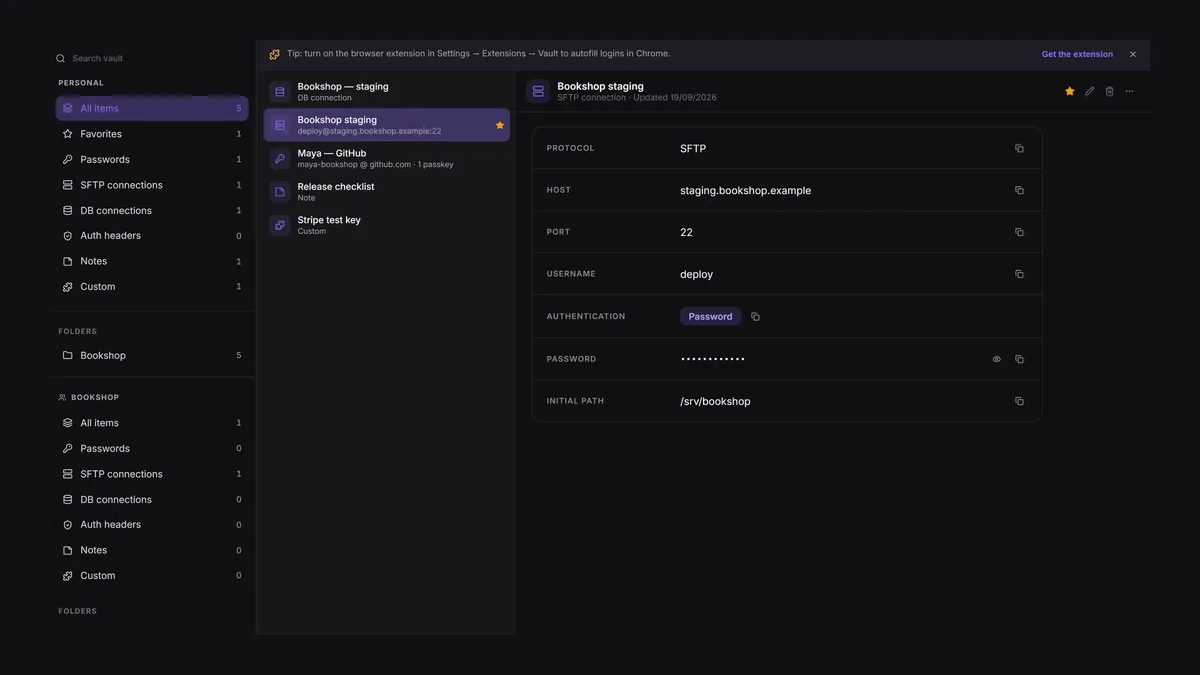
Server logins, database passwords and API keys belong in a vault that the tools use without showing the value. Apiboo’s Vault keeps passwords, SFTP and database connections, auth headers and notes encrypted with a passphrase only you know; the Terminal, FTP and DB Manager connect with its items, and a copied secret is cleared from the clipboard after 60 seconds. AI agents connected over MCP only ever see an item’s name: there are no tools that return a vault value, a variable’s value, a request’s credentials or a response. If a coding agent writes a request, it has to use a variable and ask you to fill it in.
A checklist for this afternoon
- Search your collections for "Bearer ", "api_key", "x-api-key" and "password" and replace every value with a {{reference}}.
- Mark the variables that hold those values as secret, in every environment.
- Delete old environment exports and HAR files from shared drives and tickets; rotate any key you find in them.
- If collections are in Git, add a secret check before commits (or use a client that has one) and scan the history once.
- Check which workspaces are public, forked or shared with people who no longer need them.
Try it with your own work
Import your collection into Apiboo, mark the secrets, open the Git page and connect a repository: the secret check runs on the first commit and tells you exactly which lines still carry a value.
Download Apiboo for Windows, macOS or Linux at apiboo.com/download. It is free to start, with no card and no account: every tool runs on your own machine, and you only sign in when you want sync or a team.