
Slack is where most software teams talk, and for good reason: it is fast, familiar and connects to everything. But developer teams hit two walls sooner than others. The free plan shows only 90 days of history, and the thing you are talking about — a failing request, a task, a database row, a server — is always in another app, pasted in as a screenshot or a wall of JSON.
This guide covers the Slack alternatives dev teams actually consider in 2026: the open-source ones you can self-host, and a different approach where chat is one tab of the tool you already work in. We make that last one, Apiboo, and we are clear about where a dedicated chat tool is the better choice. Competitor facts were checked on their own sites in September 2026.
Why dev teams look beyond Slack
- History on the free plan: Slack Free shows the last 90 days of messages, allows up to 10 apps, and huddles are 1:1 only.
- Per-seat pricing: Pro and Business+ are billed per user per month, which adds up for a team that mostly needs a few channels.
- Context lives elsewhere: an API response, a task or a server log becomes a screenshot, and the conversation loses the link to the real thing.
- Data location and self-hosting: some teams need their chat on their own servers.
The alternatives at a glance
What each option is, and what it costs to start (September 2026).
- Mattermost — open core, self-hosted; the MIT-licensed Team Edition for smaller teams; a free Entry tier with a 10,000-message history cap; Professional via sales. Strong on DevOps workflows and playbooks.
- Zulip — open source (Apache 2.0), self-hosted or cloud; every conversation sits under a topic inside a channel; Cloud Free searches the last 10,000 messages; Cloud Standard $6.67/user/month billed annually.
- Rocket.Chat — open source (MIT), self-hosted with Docker or Kubernetes; a free self-managed Starter plan; paid plans via sales.
- Microsoft Teams — the default if your company already runs Microsoft 365.
- Discord — free and familiar to many developers; check its admin and retention options against your company’s policies before you move work there.
- Apiboo — team chat inside a local-first developer app; requests, collections, tasks, appointments and vault secrets are shareable cards; requires an account, creating channels is part of the paid plans.
Open-source Slack alternatives you can self-host
If the goal is owning your chat, the three names to test are Mattermost, Zulip and Rocket.Chat. Mattermost feels closest to Slack and leans into engineering workflows: incident playbooks, boards and integrations with the tools DevOps teams run. Zulip’s topic model is different enough to change how a team works: each channel holds many named conversations, so a busy channel stays readable and nothing gets buried in a single scroll. Rocket.Chat is the most flexible of the three for custom deployments.
All three ask something in return: a server to run, upgrade and back up. For a platform team that already runs infrastructure, that is fine. For a five-person product team, it is a part-time job nobody signed up for.
A different approach: chat next to the work
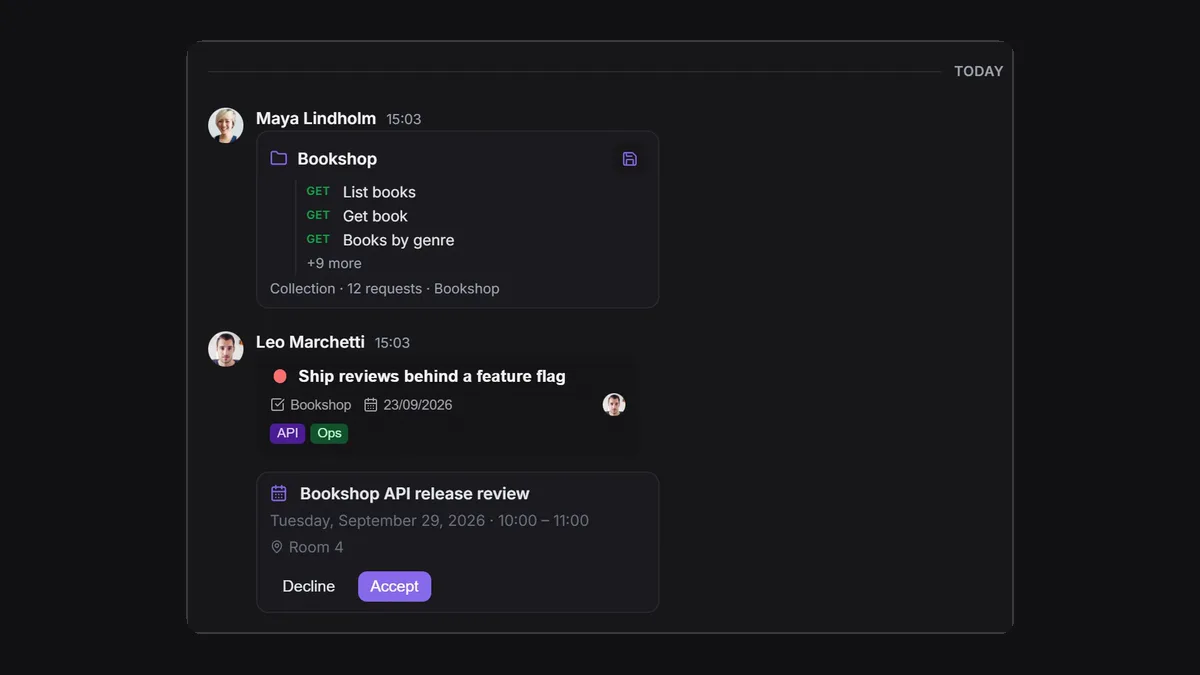
The other way to fix developer chat is to stop treating it as a separate app. In Apiboo, chat is on the same rail as the API client, the database manager, the terminal and the boards. That changes what a message can be:
- Share a request or a whole collection as a card. Your teammate clicks Open in request builder or Save to a collection, instead of retyping a pasted curl command.
- Send a task from a team board. The recipient opens and edits it in a quick view inside the chat, and the change lands on the board.
- Share an appointment as an invitation with Accept and Decline; accepting puts it in their calendar.
- Share a vault secret as a locked card, encrypted end to end for each recipient; they need their own unlocked vault to decrypt it.
- Send code blocks with a language, files, images, reactions, replies, forwards and edits.
Search built for how developers look for things
Slack’s search modifiers (from:, in:, has:, before:, after:, during:) are one of its best features, and developer chat needs the same. Apiboo’s conversation search uses Discord-style filters: has: for what a message contains (a task, a collection, a request, code, a file, a link, a shared secret and more), from: for who sent it, and before:, after: and during: for dates. has:task from:Maya invoice finds Maya’s shared tasks that mention invoices.
Two honest limits: search looks inside the conversation you have open, not across all of them, and on the Free plan it covers the last 90 days, the same window you can scroll. On paid plans, every conversation can also be exported to Markdown, JSON, plain text or HTML.
What Apiboo’s chat does not replace
Be clear-eyed about scope. Apiboo’s chat is built for a development team talking about its work, not for a whole company. There are no huddles or video calls, no app directory with thousands of integrations, and no company-wide administration beyond teams and organisations. If sales, support and leadership all live in Slack, keep Slack for them. Chat also needs an account, because messages go through Apiboo’s servers, while every other tool works signed out.
On plans: Free accounts can use direct messages and every channel they are invited to, with a 90-day history window, which for many small teams is enough to try it properly. Creating channels is part of the paid plans (Pro includes five channels and one team of up to three people; the Team plan is unlimited). Older messages are never deleted on Free; they come back when you upgrade.
Before you move a team’s chat
Whichever tool you pick, check these five things with the team first:
- History: how far back can people read and search on the plan you will actually pay for?
- Export: can you get every message out, in a format you can read without the tool?
- Where the data lives: a vendor’s cloud, your own server, or a mix, and in which region.
- What must be shared: code snippets, files, requests, tasks, secrets. Secrets should never travel as plain text.
- Who is in it: a dev-team tool is not a company-wide tool; decide which conversations move and which stay.
Which one should your team pick?
- Company-wide chat with every integration → stay on Slack, or Microsoft Teams if you run Microsoft 365.
- You must self-host and have someone to run it → Mattermost, Zulip or Rocket.Chat.
- Long technical threads that must stay readable → Zulip’s topics.
- A small dev team that talks mostly about requests, tasks and servers → try chat inside Apiboo, next to the work itself.
Related reading
The chat guide at apiboo.com/docs/team-planning/chat covers sharing, and apiboo.com/docs/team-planning/chat-search lists every search filter. For planning, see apiboo.com/blog/kanban-board-for-developers.
Try it with your own work
Bring your work with you: import your Postman or Insomnia collections so there is something to share, invite a teammate by email, and send them a request as a card.
Download Apiboo for Windows, macOS or Linux at apiboo.com/download. It is free to start, with no card and no account: every tool runs on your own machine, and you only sign in when you want sync or a team.