
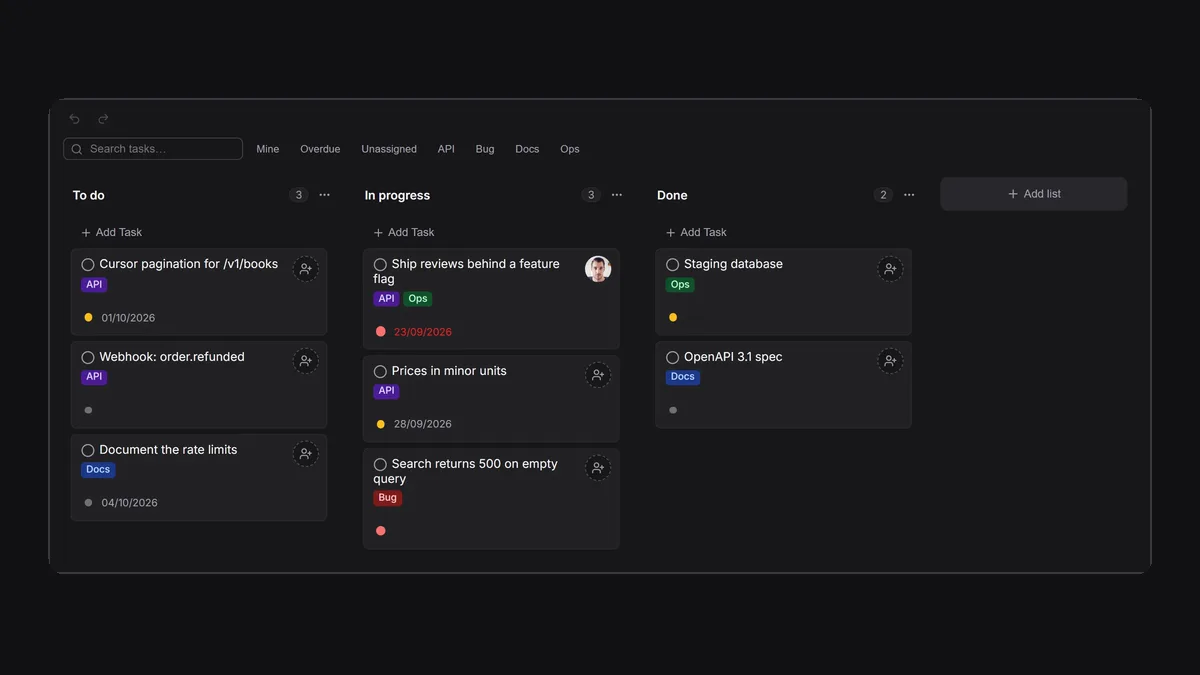
A kanban board is the simplest planning tool that works: columns for the stages of work (To do, In progress, Done), and cards you move from left to right. For a development team it answers three questions at a glance — what is being built, what is blocked, and what is next — without a sprint ceremony.
This guide is for small dev teams choosing where that board lives in 2026. It covers what developers need from a board, the honest trade-offs of Jira and Trello, the lighter alternatives, and why a board inside the tool you build APIs in is worth considering. We make one of these tools, Apiboo. Competitor facts were checked on their own sites in September 2026.
What developers need from a kanban board
- Fast capture: a task in two keystrokes, not a form with twelve required fields.
- A board and a list view: the board for flow, the list for triage.
- Labels, priorities, due dates and an assignee, and filters for “mine”, “overdue” and “unassigned”.
- A rich description with code blocks, and comments with @mentions.
- Links to the real work: the endpoint, the collection, the document or the conversation.
- In 2026, a way for AI coding agents to read the board and update it, with your permission.
Jira and Trello: the defaults, and their costs
Jira is built for software teams at scale: workflows, sprints, reports, and a huge integration catalogue. Its Free plan covers up to 10 users with 2 GB of storage, and beyond that it is per user. The cost for a small team is less the price than the weight: configuration, fields and screens that a five-person team rarely needs.
Trello is the opposite: a board and cards, easy for anyone. Its Free plan allows up to 10 collaborators per workspace and 10 boards, with unlimited cards; Standard is $5 per user per month billed annually. It is not developer-specific, so code blocks, API links and engineering filters come from Power-Ups rather than the product.
Alternatives for small dev teams
Four options that suit a team of two to ten, as of September 2026:
- Linear — fast, opinionated issue tracking loved by product teams; Free includes unlimited members, 2 teams and 250 issues; Basic is $10 per user per month. Has an official MCP server.
- GitHub Projects — included with GitHub, with table, board and roadmap layouts built on issues and pull requests; the natural choice if your work already lives in GitHub. GitHub’s official MCP server covers projects.
- Plane — open source (AGPL-3.0) and self-hostable; the cloud Free plan covers 12 users, Pro is $6 per user per month billed annually.
- Apiboo boards — kanban and list views inside a local-first developer app, next to your API client, database, terminal and chat; private boards are free and local; team boards are part of team plans.
Boards next to your API work
Apiboo’s boards live in the same app as the requests they describe. A board is private (yours, on this device or synced) or a team board that every member sees and edits live. Each card has a title, a done circle, a priority dot that cycles Low, Medium, High, a due date that turns red when overdue, label chips, and on team boards an assignee. The toolbar switches between Kanban and List view, with undo and redo, and on a team board the avatars of teammates looking at the same board appear there.
Opening a card gives you a rich description (the same editor as Documents, with code blocks, tables and images), priority, labels, due date, assignee and owner, and comments with @mentions on team boards. The filter bar narrows to Mine, Overdue, Unassigned or any label, and shows how many tasks match. When a teammate needs to see a task, Send to chat drops it into your direct message as a card they can open and edit without leaving the conversation.
AI agents that can update the board, with your permission
The newest reason to care where your board lives is AI coding agents. Linear, Atlassian and GitHub all ship MCP servers so agents such as Claude Code can read and write issues. Apiboo has one built in, running on your own machine at 127.0.0.1.
With the Boards read permission, an agent can see your boards, lists and tasks to learn what is in progress and what is blocked. With the write permission, it can create boards and lists, add and update tasks, move cards and comment. It cannot set labels or assignees. Every permission starts off, deleting anything needs a separate destructive switch, and when an agent edits text a person may have typed, it must prove it read the latest version, so it never silently overwrites your change. A good loop: the agent reads the board, picks up the next task, does the work in your terminal, moves the card to Done and leaves a comment.
A simple board setup for a dev team
You do not need a methodology to start. Four lists cover most small teams: Backlog, To do, In progress and Done. Keep In progress short; if it holds more cards than people, work is stuck somewhere. Add a handful of labels that match how you talk (API, Frontend, Bug, Docs, Ops), give every card with a deadline a due date, and filter by Overdue in your weekly check-in.
Write the task description for the person who picks it up next month: what the endpoint should do, how to test it, and a link to the request or the document. Use comments for decisions, so the reasoning stays with the card rather than in a chat thread nobody can find.
Honest limits
Apiboo’s boards are a kanban tool for a dev team, not a portfolio-management suite. There are no sprints, story points, burndown charts or custom workflows, and deleting a board has no archive. If you need those, Jira or Linear is the better fit.
On plans: private boards are free and unlimited on your machine; on Free, up to 3 boards and 50 documents also sync to the cloud and the web app. Team boards need a team, which starts with Pro (one team of up to three people) and the Team plan for larger teams. The Graph, which maps how your boards, documents and requests connect, shows your personal items only.
Which board should you pick?
- Many teams, sprints and reporting → Jira.
- A mixed team where non-developers plan too → Trello.
- A product team that wants speed and polish → Linear.
- Everything already in GitHub issues → GitHub Projects.
- Must self-host and stay open source → Plane.
- A small team whose work is APIs, databases and servers, with AI agents in the loop → Apiboo boards.
Related reading
The boards guide at apiboo.com/docs/team-planning/boards covers every control, and apiboo.com/docs/security-ai/mcp-agents explains agent permissions. For the conversation side, see apiboo.com/blog/slack-alternatives-for-developers.
Try it with your own work
Create a private board in a minute, then import the collection it is about (Postman, Insomnia, Bruno, OpenAPI or HAR) so the tasks and the requests live side by side.
Download Apiboo for Windows, macOS or Linux at apiboo.com/download. It is free to start, with no card and no account: every tool runs on your own machine, and you only sign in when you want sync or a team.