
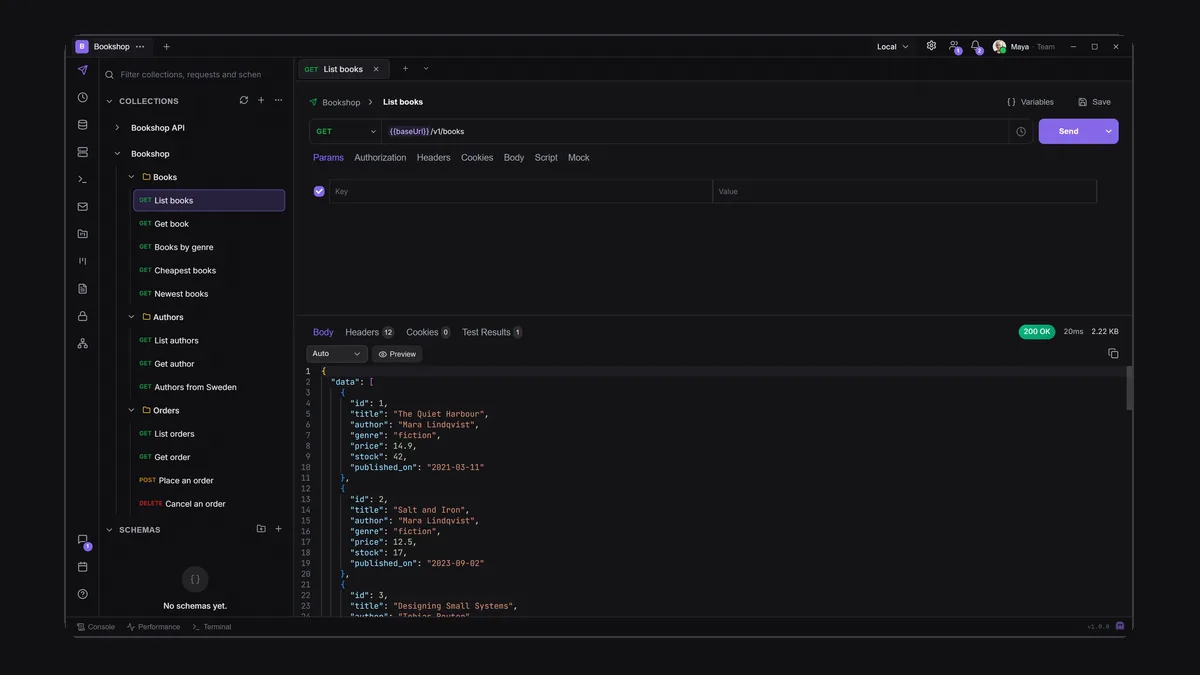
Look at the taskbar of a backend developer on a normal day: an API client, a database GUI, an SSH client or two, an SFTP window, a local mail catcher for testing sign-up emails, a chat app, a task board and a notes app. Each one is good at its job. Together they are eight logins, eight places where credentials are stored, and a constant context switch.
An all-in-one developer workspace puts those tools in one app. This guide looks at what that actually buys you, what it costs, and when separate best-of-breed tools are still the better call. We build one, Apiboo, so we include its limits alongside its strengths. Prices for other tools were checked on their sites in September 2026.
The usual stack, and what it costs
A typical setup for a small backend team, with one representative tool per job:
- API client — Postman: Free is one user; Team $19/user/month billed annually.
- Database GUI — TablePlus: $99 per device, perpetual with a year of updates; or DBeaver Community, free and open source (Apache 2.0).
- SSH and SFTP — Termius: free Starter for local use, cloud sync from Pro at $10/month billed annually; or WinSCP and FileZilla, free and GPL.
- Local mail testing — Mailpit: free, open source, a single binary with a web UI (MailHog, the older option, is no longer maintained).
- Chat — Slack: Free keeps 90 days of history; paid plans per user.
- Boards — Trello or Jira: free for small teams, per user beyond that.
What one app changes
The case for consolidation is not the price; several of those tools are free. It is the seams between them:
- One vault for everything: database logins, SSH keys, SFTP passwords and API headers live in one encrypted vault, and the DB manager, terminal and file transfer connect with its items.
- Links between the work: a chat message can carry the collection or the task, and your Graph can link a document to the request it describes.
- One search: a command palette that finds requests, documents, boards, chat channels and people.
- One permission model for AI agents: grant an agent read access to your collections and boards once, instead of wiring five integrations.
- Fewer accounts: nothing to sign into for local work.
What Apiboo puts in one window
Apiboo is a local-first desktop app for Windows, macOS and Linux. The tools on its rail:
- API client — REST, GraphQL, WebSocket, SSE and gRPC; OAuth 2.0, AWS Signature v4, mTLS; scripts with boo.*, Postman’s pm.*, Bruno’s bru.* and Hoppscotch’s pw.*; a collection runner, a local mock server, code generation in nine languages; import from Postman, Insomnia, Bruno, Hoppscotch, OpenAPI, HAR and cURL.
- DB Manager — PostgreSQL, MySQL and SQLite, a fast grid with a review step before edits are saved, TLS options, and connections stored in the vault.
- Terminal — your local shells, SSH sessions from the vault (the key never shows on screen), up to eight split panes per tab, and one-click coding agents such as Claude Code and Codex.
- FTP / SFTP — SFTP, FTP and FTPS with a local and remote pane, and a file editor for remote files.
- Mail catcher — a local SMTP server on 127.0.0.1 with an inbox, HTML and raw views, and an offline spam check.
- Boards, documents, calendar and chat — kanban and list views, a rich documents editor with PDF, Markdown and HTML export, team calendars, and chat where requests and tasks are shareable cards.
- Vault, MCP and Graph — passwords, keys and passkeys encrypted with your passphrase; a built-in MCP server for AI agents with per-area permissions; and a Graph of how your personal items connect.
A day in one window
A realistic morning: a card on the team board says the orders endpoint returns 500 for empty carts. You open the request from the collection, send it against staging and see the error. In the DB Manager you query the orders table on the same staging connection and find the row. In the terminal you open an SSH session to the staging server from the vault and tail the log. Fix, deploy, re-run the collection, move the card to Done, and send the passing request to your teammate in chat as a card. Every step used a credential from the same vault, and none of them needed another app.
Local-first matters more when everything is in one place
Putting your API tokens, database logins and SSH keys in one app is only a good idea if that app keeps them on your machine. Apiboo stores its data in a local database, works offline, and needs no account for any local tool. The vault is encrypted with a passphrase only you know, and AI agents connected over MCP only ever see an item’s name, never its secret. You can also encrypt the whole local database at rest. Sync is something you switch on, and when you do, the application servers and primary database are in the EU, with a US edge for speed.
When separate tools are still better
Consolidation has real costs, and we would rather you hear them from us:
- Depth in one discipline: a DBA who lives in a database all day will find more in DBeaver or DataGrip (more engines, ER diagrams, profiling). Apiboo’s DB Manager covers PostgreSQL, MySQL and SQLite.
- Company-wide chat: Slack or Teams, with huddles, calls and thousands of integrations, is the right tool for a whole company; Apiboo’s chat is for a dev team.
- Heavy project management: sprints, story points and reports belong in Jira or Linear.
- Protocol edge cases: Apiboo’s gRPC covers unary and server-streaming calls; its runner has no iterations or data files yet.
- Open source requirements: Apiboo is a commercial product; DBeaver Community, WinSCP, Mailpit and Bruno are open source.
- One app is one dependency: if you only ever need an API client, a focused client is simpler.
What it costs
Every local tool in Apiboo is free: the API client, DB Manager, terminal, FTP/SFTP, mail catcher, boards, documents, vault and the AI assistant with your own key. On Free you can also sync up to 3 boards and 50 documents and use the web app. Pro adds unlimited sync, cloud API workspaces, vault sync, cloud mocks and one team of up to three people; the Team plan adds shared team workspaces without that limit, organisations, roles and central billing. Current prices are at apiboo.com/pricing.
How to try it without switching everything
Consolidating is not all-or-nothing. Start with the tool that hurts most, usually the API client or the SSH client, and leave the rest where it is. Import one collection, add one database and one server to the vault, and use Apiboo for a week alongside your current tools. The docs at apiboo.com/docs walk through each tool; apiboo.com/blog/postman-alternatives covers the API client in depth.
Try it with your own work
Import a Postman, Insomnia, Bruno or OpenAPI collection, and bring your passwords over from a Bitwarden or LastPass export into the vault, so your first session already has your real work in it.
Download Apiboo for Windows, macOS or Linux at apiboo.com/download. It is free to start, with no card and no account: every tool runs on your own machine, and you only sign in when you want sync or a team.